How to setup VM on Linux
Install Stuff
sudo pacman -S --needed \
  qemu-base qemu-img libvirt virt-manager virt-viewer \
  dnsmasq iptables-nft edk2-ovmf swtpm bridge-utils
User Permissions
sudo usermod -aG libvirt,kvm $USER
newgrp libvirt   # or log out/in
Start libvirtd
sudo systemctl enable --now libvirtd.service
Some Simple Checks
# Check number of CPUs, anything above 0 is good
egrep -c '(vmx|svm)' /proc/cpuinfo

# Check kernel modules are loaded
lsmod | grep -E 'kvm_(intel|amd)|kvm'
If you launch from this point, you'll see that NAT is inactive.
If you continue, virt-manager will ask you to activate it.
Once you do, it should be good to go for the next time you install a vm.
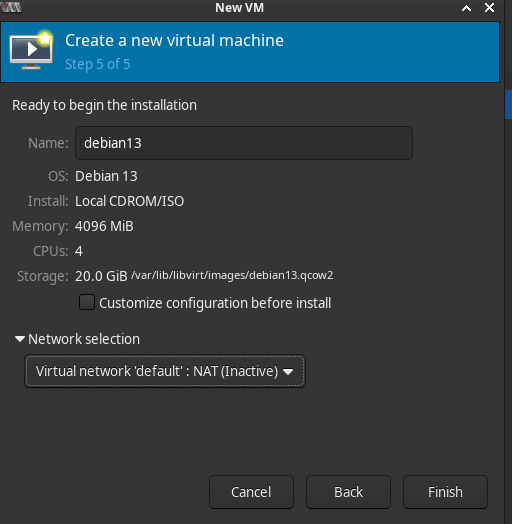
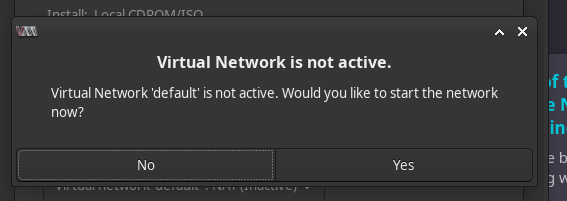
You will see virbr0 when you run ip a...

If you want to setup NAT manually before reaching this point, do the following:
sudo virsh net-define    /usr/share/libvirt/networks/default.xml 2>/dev/null || true
sudo virsh net-autostart default
sudo virsh net-start default # This is the part that addresses the "inactive" part from the screenshot above
ip a show virbr0   # virbr0 will show up in network interfaces
Once launched, use ctrl + alt to release mouse...
Bridging the Network
so that you can use normal network IPs and ssh from a different system...
I'll use nmcli, since I am using a gui, this is usually the safe bet.
-
Identify NIC
- Use
ip aor nmcli d | awk '$2=="ethernet"{print $1,$3,$4,$NF}'
- Use
-
Create Bridge
# Create bridge (no STP for simplicity); make it auto-connect sudo nmcli con add type bridge ifname br0 con-name bridge-br0 stp no # Add the NIC as a bridge slave sudo nmcli con add type bridge-slave ifname enp3s0 master br0 -
Move IP/DHCP to bridge
sudo nmcli con mod bridge-br0 ipv4.method auto ipv6.method auto
sudo nmcli con up bridge-br0
Rollback
Because I love being able to clean up my mistakes.
sudo nmcli con down bridge-br0
sudo nmcli con delete bridge-br0
sudo nmcli con delete bridge-slave-enp3s0
sudo nmcli con up <your-old-wired-connection>